How to Switch PHSP Administrators Without Disrupting Employee Claims
A structured handoff of claims and limits keeps employee reimbursements flowing.

Switching PHSP administrators need not interrupt employee reimbursements. For a Canadian small business with a health spending account, the protection is a carefully ordered handoff that settles pending claims, preserves plan-year credits, and tells employees where to file before the old administrator leaves. A new platform is not a fresh start for existing claims or annual limits.
Why businesses switch PHSP administrators and what can go wrong
A different service offering can be a reason to switch, but the transition puts reimbursements at risk. In a self-insured Private Health Services Plan, or PHSP, the employer funds the claims while the administrator reviews and processes them. A PHSP can also be backed by an insurance contract. The structure affects what is being handed over. For a self-insured plan, changing the business that processes claims should not leave employees without a route to payment.
The trouble starts when employers overlook the claims handoff involved in this billing change. An employee may have incurred an eligible expense under the old arrangement but not yet submitted it when access changes. If it is unclear who is responsible for that claim, reimbursement can stall. Changing administrators also leaves CRA requirements and the rules that apply to an expense in place. The new administrator needs enough history to apply the right limits.
A House of Commons Standing Committee report acknowledged that switching administrators and modernizing the Public Service Health Care Plan, or PSHCP, simultaneously contributed to processing problems. That experience offers a concrete lesson for smaller employers. Separate the administrator change from any benefit redesign so that employees and administrators are not navigating both at once.
What the outgoing administrator still owes employees after notice is given
Before giving notice, ask the outgoing administrator to put in writing what it must do when the contract ends. This should cover the run-off window, the deadline for submitting claims, and who will review and pay claims already incurred. Notice is not the end of the job. The termination terms should state that the administrator will continue to process eligible claims through the agreed run-off period.
The run-off period gives employees time to submit expenses they have already incurred. It follows the end of a plan year or the giving of notice, depending on the arrangement. A window of a few months is standard, and the transition outline uses 60 days from termination as a typical example. The contract must settle the actual deadline. Do not build the schedule around an assumed window that the administrator has not agreed to honour.
The PIPSC PSHCP FAQ states that the policies and limits in effect on the day an expense is incurred remain the governing rules. Employees who submit a receipt after the handoff for care received before it remain protected by the rules in effect when the expense was incurred. The termination agreement should make responsibility for those submissions clear, including which administrator will review them and complete reimbursement.
Annual reimbursement maximums also do not reset when the administrator changes. Any amount an employee has already claimed against a benefit category must remain part of the running total. That history belongs in the handoff. Otherwise, the new administrator cannot reliably determine how much reimbursement room remains, even if the employee’s enrolment details are correct.
Setting a transition date that protects the claim cycle
Plan-year end is the clearest starting point for choosing a transition date because it separates the accounting periods. With a mid-year switch, some annual credits have already been spent, and the claims history is split between administrators. Both must account for the same year. At year-end, each administrator can handle its own period without having to work out how much of the annual credits was used before the change.
However, plan-year end and the end of claims processing are not the same date. Employees may still submit expenses from the year that is ending during run-off. The schedule needs to show when the closing plan year ends, when claims for that year are due, and when the final administrator cutover will take place. In the steps set out here, final cutover comes after the full run-off period, once the outgoing administrator has finished processing the claims that were submitted.
That timing needs a clear explanation of where employees file. Running two administrators concurrently can create conflicting claim decisions and confusion about which one is responsible. Do not accept a proposed go-live date without settling those responsibilities. The employer should base the date on the claim cycle, even if the new administrator would prefer a different start date.
Setup also needs room in the schedule. Complete enrolment, test the claims portal, and resolve data-transfer issues before employees need the new service. If benefits are changing too, put that change on a separate date. This keeps a platform handoff from becoming an argument about whether an expense is covered under old or new rules.
Confirming what claim data must transfer and in what form
Request the transfer contents in writing, with enough detail to show where every employee stands. The export must show each employee’s running annual credit balance and how much they have already claimed against it. It must also show annual reimbursement totals by benefit category so the receiving administrator can apply the remaining limits. These are not interchangeable records. An overall balance alone does not explain how much has been used within a category.
The same request must ask for every open claim and its status, including whether it has been submitted, is under review, or has been approved but not yet reimbursed. An approval does not mean payment is complete. Include employee and dependant enrolment details, with any changes made during the year, so the receiving records reflect who is covered.
Ask for a structured, exportable format that the new administrator can import. Manual re-entry should not be the default handoff. Before signing off, check the export against the employer’s own records and sort out any differences in balances, enrolment, or claim status. The old administrator should not be offboarded while that reconciliation remains unfinished.
Any claim still in the outgoing queue at the transition date needs an explicit disposition. Resolve it before cutover or formally transfer it as an open item with its full documentation. It must not disappear between systems. Separately, tell employees to keep receipts and supporting claim documents for at least six years from the end of the tax year to which they relate, because an audit or appeal can arise long after the switch.
Vetting the new administrator for CRA compliance before signing
A cheaper or easier service is not enough if the underlying arrangement fails to qualify as a PHSP. Health Spending Account, or HSA, and Health Care Spending Account, or HCSA, are common product names, but the name does not establish the tax treatment. When a PHSP qualifies, employer-paid medical expenses are generally not taxable to employees, and the employer can generally deduct the cost. That is the financial stake in the choice.
For the employer, the practical test is whether claim decisions remain independent. The employer sets eligible expenses, annual limits, and employee classes ahead of time, and the administrator then approves or denies each claim. The employer should not override those decisions. That power risks turning a PHSP reimbursement into a taxable benefit, making the administrator’s decision process a compliance question.
An Administrative Services Only, or ASO, structure formalizes the separation between funding and administration. The PSHCP administrator FAQ says that, in this model, the employer funds its own benefit plan and hires a third party to process and pay claims. Funding does not confer control over individual approvals. Before signing, check how the proposed arrangement keeps those roles separate and get the written plan document that sets out eligible employees, annual limits, and expense rules.
The documentation obligation remains with the employer or plan sponsor, even when the administrator helps prepare the document. It must be based on an agreement made before the expenses it covers are incurred. Also check the proposed expense coverage. The CRA-eligible medical expense list used for the Medical Expense Tax Credit applies to PHSPs, so ask whether the administrator supports the full range rather than imposing narrower eligibility without a tax justification.
What to communicate to employees and when
Before notifying the outgoing administrator, tell employees that a transition is planned and give them the target date. Explain what the run-off deadline means for expenses already incurred but not yet submitted. An expense date and a filing deadline serve different purposes. Employees need both to know which rules apply and how long they have to send in a claim.
Keep that first message focused on what employees need to do with existing receipts. Explain where those claims should go and what information will follow before cutover. Do not leave the filing route implied. Someone with an old expense still to submit should be able to tell from the message whether the old portal is still accepting claims.
At cutover, provide the new claims portal or submission process, any updated employee ID or plan number, and a clear statement of the employee’s transferred credit balance. State that the change is administrative. The same eligible expenses, annual credit, and CRA rules apply when only the administrator is changing. The platform and contact point are what employees need to learn.
After cutover, explain the status of any old-period claims that were formally transferred and identify whom employees should contact if payment does not arrive. Keep the distinction between submission and reimbursement clear. The same FAQ modelled useful communication by explaining that annual maximums do not reset, identifying how earlier expenses would be treated, and directing members to the website they should use. Small employers can follow that structure without making employees read the administration contract.
The steps in order: a transition sequence that keeps claims moving
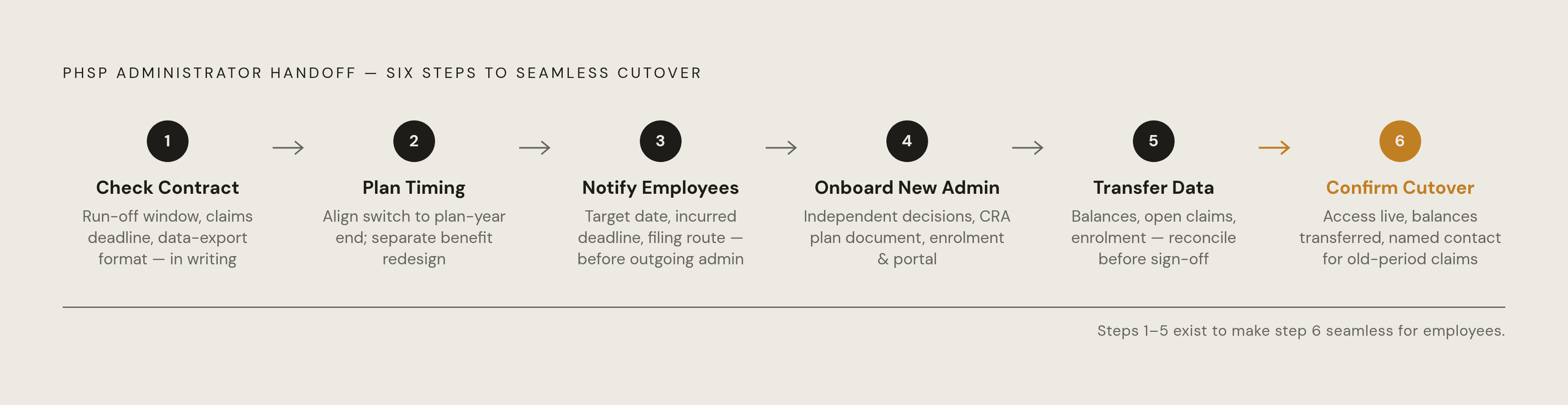
First, check the outgoing contract before giving notice. Get the run-off window, claims-submission deadline, and data-export format in writing, along with who will make sure reimbursement is completed. Then plan the timing of the switch around plan-year end and the full run-off period. Keep any benefit redesign on a separate date.
Next, notify employees before the employer notifies the outgoing administrator. Give them the target date, the deadline for incurred-but-not-submitted expenses, and a clear explanation of what happens next. Then vet and onboard the receiving administrator. Confirm independent claim decisions, obtain the CRA-compliant plan document, and complete enrolment and portal setup before cutover, while keeping the employer’s responsibility for plan documentation clear.
Once the receiving administrator is ready, execute the data transfer. Obtain the structured export of balances, category totals, open claims, and enrolment records, then compare it with internal records before signing off. Resolve discrepancies before closing the old relationship. The outgoing administrator should continue through the full run-off period and should not be offboarded until its pre-transition claims have been adjudicated and reimbursed, with any formally transferred open item fully documented.
Finally, confirm cutover with employees by giving them access, the balances that were transferred, and someone to contact about outstanding old-period claims. This is the point at which the preparation becomes visible to the people using the plan. A complete handoff gives them a filing route and someone accountable for payment. Skipping a step leaves a gap that employees will eventually encounter, which is why the sequence—not the act of signing with a new administrator—is the protection.
Sources
- Public Service Healthcare Plan FAQ - PIPSC
- New Public Service Health Care Plan (PSHCP) administrator frequently asked questions - Canada.ca
- Committee Report No. 20 - OGGO (44-1) - House of Commons of Canada
- Private Health Services Plan (PHSP) Canada: CRA Rules and Eligibility
- Committee Report No. 20 - OGGO (44-1) - House of Commons of Canada